
 Previous
Next
Previous
Next


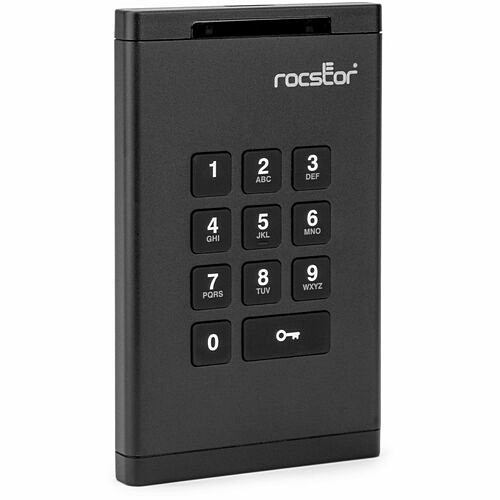
Rocstor DataSecure EX20 8 TB Portable Rugged Solid State Drive - External - Black - TAA Compliant - Thin Client Device Supported - USB 3.2 (Gen 1) Type C - 355 MB/s Maximum Read Transfer Rate - 256-bit AES-XTS Encryption Standard - 3 Year Warranty - (E76024-B1)
Rocstor DataSecure EX20 8 TB Portable Rugged Solid State Drive - External - Black - TAA Compliant - Thin Client Device Supported - USB 3.2 (Gen 1) Type C - 355 MB/s Maximum Read Transfer Rate - 256-bit AES-XTS Encryption Standard - 3 Year Warranty - (E76024-B1)
Part Number: E76024-B1
Condition: New
Availability: 12
Real time availability 

Best of Cleveland Award in the Computers category

Compsource is honored to be named to the Inc. 500|5000 list

Ranked among the top 500 companies

Microsoft authorized Education reseller

HP Qualified Supplies Partner

BBB Accredited Business Since 2000



- Shipping Insurance
- Price Match Guarantee
- Terms of Service Guarantee
- Identity Theft Protection
Product Specifications
Rocstor DataSecure EX20 8 TB Portable Rugged Solid State Drive - External - Black - TAA Compliant - Thin Client Device Supported - USB 3.2 (Gen 1) Type C - 355 MB/s Maximum Read Transfer Rate - 256-bit AES-XTS Encryption Standard - 3 Year Warranty - (E76024-B1)
DATASECURE EX20 8TB SSD USB PORTABLE ENCRYPTED HARD DRIVE - FIPS 140-2 LEVEL 3 V
Manufacturer Part Number: E76024-B1
MANUFACTURER NAME: Rocstor
MANUFACTURER PART NUMBER: E76024-B1
UPC EAN CODE: 810136922622
LANGUAGE: EN
MARKET:US
| General Information: | |
Ultimate Hardware Encryption for High-Level Data Protection Safeguard your critical data with the Rocstor DataSecure EX20 8TB SSD USB Portable Encrypted Drive - a solid state drive engineered for professionals who demand uncompromising security. Featuring XTS-AES 256-bit real-time encryption, and a wear-resistant PIN keypad authentication system, the EX20 ensures your data remains protected from unauthorized access - whether you're working remotely, on-site, or in high-risk environments. Its tamper-evident design and password-protected interface offer a powerful layer of physical and digital defense. Certified to Meet the Highest U.S. Government Standards The EX20 is FIPS 140-2 Level 3 validated (cert. #3297), offering advanced protection trusted by government and enterprise-level security protocols. Unlike drives limited to module-only certification, the EX20's FIPS validation covers the entire unit - including internal components, logic boards, and encryption modules - ensuring comprehensive security. An epoxy-coated cryptographic module prevents hardware tampering, making the EX20 suitable for handling classified and sensitive information. Secure Authentication with Built-In Brute-Force Protection Accessing the drive is simple and secure with the integrated keypad that supports strong PIN authentication. Designed to defend against brute-force attacks, the EX20 features an intelligent lockout system that automatically deletes the encryption key after 10 failed login attempts. This auto-wipe mechanism makes it impossible to retrieve any data once the key is destroyed, ensuring protection even in case of loss or theft. Flexible, Software-Free Operation Across All Platforms Engineered for plug-and-play convenience, the EX20 requires no software or drivers - simply connect and unlock. It's fully OS-independent and compatible with Windows, macOS, Linux, and even embedded or custom operating systems, making it a reliable choice across IT ecosystems. Whether used in healthcare, government, legal, or enterprise sectors, this device integrates effortlessly into high-security workflows. Built to Last with Compliance You Can Trust Rugged and compact, the EX20 features a shock-resistant, aircraft-grade aluminum enclosure and a travel case for maximum portability. It also meets NIST SP-800-88 data sanitization guidelines, ensuring secure decommissioning. With TAA compliance alongside HIPAA and CMMC standards, the EX20 helps organizations meet strict regulatory mandates while protecting sensitive data from end to end. Backed by Rocstor's 3-year limited warranty and lifetime technical support. | |
| Manufacturer | Rocstor |
| Manufacturer Part Number | E76024-B1 |
| Manufacturer Website Address | http://www.rocstor.com |
| Brand Name | Rocstor |
| Product Line | DataSecure |
| Product Model | EX20 |
| Product Name | DataSecure EX20 8TB USB Portable Encrypted Drive |
| Packaged Quantity | 1 |
| Product Type | Solid State Drive |
| Product UPC | 810136922622 |
| Technical Information: | |
| Storage Capacity | 8 TB |
| Platform Supported | Linux
Mac PC |
| Encryption Standard | 256-bit AES-XTS |
| Drive Performance: | |
| Maximum Read Transfer Rate | 355 MB/s |
| Maximum Write Transfer Rate | 333 MB/s |
| Interfaces/Ports: | |
| Host Interface | USB 3.2 (Gen 1) Type C |
| Physical Characteristics: | |
| Rugged | Yes |
| Color Family | Black |
| Product Color | Black |
| Drive Type | External |
| External Drive Type | Portable |
| Durability | Shock Proof |
| Height | 4.9" |
| Width | 3" |
| Length | 0.5" |
| Weight (Approximate) | 3.52 oz |
| Miscellaneous: | |
| What's in the box |
|
| Device Supported | Thin Client |
| Operating System Compatibility | Windows
Mac OS Linux ChromeOS |
| TAA Compliant | Yes |
| Environmental Compliance | Restriction of Hazardous Substances (RoHS) |
| Warranty: | |
| Warranty | 3 Year |
What Can Your Device Hold?

1Photos based on a 10-Megapixel camera producing images 5MB in size
2Songs based on average length of 4 minutes, 4MB size
3HD video based on 720p or 1080i video
4Blu-ray HD Movie was calculated at 16.2Gb per hour recording rate
Questions and Answers
Questions and Answers | Ask CompSource |
Shipping / Returns
Shipping
Ground =
FREE
(EST. Arrival Date between
Wed.Apr.22 - Mon.Apr.27)
Two Day Air = $26.00
(EST. Arrival Date on Wed.Apr.22)
Standard One Day = $38.00
(EST. Arrival Date on Tue.Apr.21 after 3PM)
Priority = $55.00
(EST. arrival Date on Tue.Apr.21 in the AM)
U.S Mail Priority (AA,AE,AP only) = $32.00
FedEx International Economy (Canada only) = $86.00
Shipping dates are best estimates based on product location and may vary with holidays.
If product requires trucking, additional fees may apply.
* Some destinations are subject to Applicable State/Duty Taxes
Returns
CompSource realizes that every product may have different return guidelines. Please see the policy below regarding this item.
This Product Has Limited Exchange Privileges.
Limited returns within 30 days of purchase permitted on this product.
For support on this product, please contact Rocstor. 1 (818) 449-2000 www.rocstor.com
Rocstor Company's Information

Click Rocstor for all products
Toll Free #: 1 (818) 449-2000
Site: www.rocstor.com
Accessories



Product Reviews
Overall Rating | Write a Review
|
|
Best Sellers
More Best Sellers



Recently Viewed



Learn more about Hard Drives
Everything You Want to Know About Hard Drives.
Understanding hard drive basics will help you make better storage decisions.What's a Hard Drive Do?
A hard drive is the hardware component that stores all of your digital content. Your documents, pictures, music, videos, programs, application preferences, and operating system represent digital content stored on a hard drive. Hard drives can be external or internal.
Everything stored on a hard drive is measured in terms of its file size. Documents (text) are generally very small whereas pictures are large, music is even larger, and videos are by far the biggest. A hard drive determines the size of digital files in terms of megabytes (MB), gigabytes (GB), and terabytes (TB).
There are 3 major versions of hard drive technologies. All of them have pros and cons and reasons for owning each versions;
Standard Hard Drives
- This is an older technology but has continued to evolve in speed and reliability. Basically the technology is like a record player except the platters are metal instead of vinyl and the needle is magnetic allowing you to read, write and erase. The faster the hard drive spins, or RPM, the faster the read and write happens.
Pros -- Cheapest per GB, very reliable and easily replaceable.
Cons -- Much slower than newer technologies.
Solid State or SSD Drives
- Solid State is basically a form of memory that can be written to and the data will stay saved even with the power off!
Pros -- Very Fast read/write, no moving parts so it is quiet and in theory should last longer, less heat and energy.
Cons -- Price per GB is more expensive than Standard HDD.
M.2 Drives
- An M.2 SSD is a solid-state drive (SSD) that conforms to a computer industry specification written for internally mounted storage expansion cards of a small form factor. Shaped like a stick of gum. Most M.2 SSDs are 80 x 22mm (L x W), but they can be shorter or longer. You can tell what size an M.2 SSD is by reading the four or five-digit number in its name: the first two numbers are its width, while the others are its length (example: M.2 Type-2280).
Pros -- Small for factor and SPEED,!!! M.2 card can use either the existing SATA 3.0 specifications and be restricted to the 600MB/s or it could instead elect to use PCI-Express that provides a bandwidth of 1GB/s under the current PCI-Express 3.0 standards.
Cons -- Compatibility, since this is an internal storage device your motherboard must be newer and include the proper slot(s) to accommodate this storage technology.
Hybrid Hard Drives
- A Hybrid Hard Drive may be the best of both worlds. In a Hybrid Drive you have both SSD and Platter or Standard Hard Drives included in one device. Typically you have a smaller SSD Drive coupled with a larger HDD. You have the low price per GB of an HDD and the speed of an SSD. This type of drive is a great choice for SMB workstations all the way to gaming machines.
Pros -- Best overall value for the dollar as well as speed ratio.
Cons -- Can add a level of complexity to some users as you basically have 2 drives in one and will have to be aware of what drive you will save data vs programs to.
If you have an older Computer or notebook consider the SSD option as it will make your system feel new again with this faster storage technology.
Internal vs. External or Portable Hard Drives
External desktop hard drives are built using a drive and require an AC adapter plugged into a power outlet. These drives are a good choice for supplementing a desktop computer or plugging into a laptop's home base, and typically can extend your need to upgrade your hard drive or more importantly it can be used as a backup drive. As the saying goes "It's not if, but when something fails!" Please Backup...CompSource wants this to be as easy and stress-free as possible.
We're here to help you decide. Chat with us or give our professionals a quick phone call (800)-413-7361, we can assist with the best solution for your needs and budget.
Our WatchGuard XTM 515 security bundle subscription expired and CompSource expedited the order so that we had our new subscription key within a few hours of placing the order. Thank you CompSource! Doug in San DiegoMore Reviews