
 Previous
Next
Previous
Next


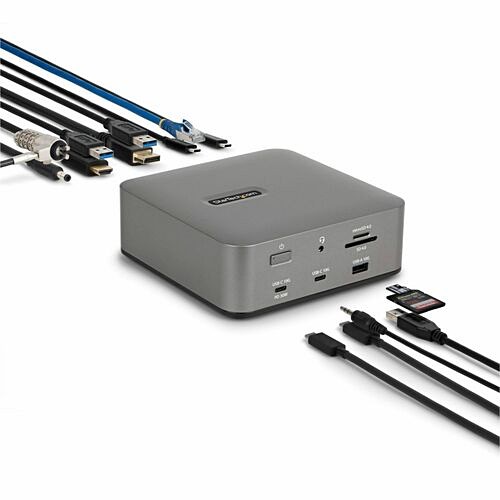
StarTech.com Thunderbolt 5 Docking Station, DP/HDMI, Triple Monitor Dock up to 4K 144Hz or Dual 8K 60Hz, 5x USB Ports/140W Laptop Charging - Thunderbolt 5 Certified, USB4 Compatible Dock with driverless compatibility in Windows 11 and macOS 15 / 26; (215N-TB5USB4DOCK)
StarTech.com Thunderbolt 5 Docking Station, DP/HDMI, Triple Monitor Dock up to 4K 144Hz or Dual 8K 60Hz, 5x USB Ports/140W Laptop Charging - Thunderbolt 5 Certified, USB4 Compatible Dock with driverless compatibility in Windows 11 and macOS 15 / 26; (215N-TB5USB4DOCK)
Part Number: 215N-TB5USB4DOCK
Condition: New
Availability: 36
Real time availability 

Best of Cleveland Award in the Computers category

Compsource is honored to be named to the Inc. 500|5000 list

Ranked among the top 500 companies

Microsoft authorized Education reseller

HP Qualified Supplies Partner

BBB Accredited Business Since 2000



- Shipping Insurance
- Price Match Guarantee
- Terms of Service Guarantee
- Identity Theft Protection
Product Specifications
StarTech.com Thunderbolt 5 Docking Station, DP/HDMI, Triple Monitor Dock up to 4K 144Hz or Dual 8K 60Hz, 5x USB Ports/140W Laptop Charging - Thunderbolt 5 Certified, USB4 Compatible Dock with driverless compatibility in Windows 11 and macOS 15 / 26; (215N-TB5USB4DOCK)
Thunderbolt 5 Docking Station
Manufacturer Part Number: 215N-TB5USB4DOCK
MANUFACTURER NAME: Startech
MANUFACTURER PART NUMBER: 215N-TB5USB4DOCK
UPC EAN CODE: 065030923101
LANGUAGE: EN
MARKET:US
| General Information: | |
Simplify your workspace with a high-performance dock that supports Thunderbolt 5, Thunderbolt 4, and USB4 laptops. Supports multiple displays up to triple 4K displays, 140W laptop charging, and 2.5G Ethernet, all through a single connection. Advanced Display and Charging Capabilities Connect up to three 4K 144Hz displays using a combination of HDMI, DisplayPort, and USB-C outputs or dual 8K 60Hz via HDMI and DisplayPort. The docking station includes an 180W power adapter that can supply up to 140W to charge high-performance laptops such as the MacBook Pro M4. A dedicated 30W USB-C port provides data connectivity and charging for phones or tablets without drawing power from the host computer. Networking and Compatibility Enjoy faster cloud access, file transfers, and virtual collaboration with the wired 2.5G Ethernet RJ45 port. Driverless dock is compatible out of the box with Windows 11 and macOS 15 / 26 systems that feature Thunderbolt 5, 4, or USB4 connectivity, helping ensure IT-managed deployments stay efficient and consistent. Secure and High-Functioning Workspace Dual security slots (K-Slot and Nano) let you physically secure the dock helping prevent theft in shared environments or high-traffic workspaces. This dock features built-in SD 4.0 and microSD 4.0 card slots for fast transfers from UHS-II-compatible memory cards. A 3.5mm audio jack supports headsets or speakers for seamless conferencing or media playback. Enterprise Management Tools StarTech.com Connectivity Tools offer practical utilities to support device management and increase productivity in modern IT environments. With features such as MAC address pass-through, Wi-Fi auto-switch, and USB device monitoring, the software helps IT teams streamline deployment and enhance security across diverse setups. Download the StarTech.com Connectivity Tools to optimize your device setup . | |
| Manufacturer | StarTech.com |
| Manufacturer Part Number | 215N-TB5USB4DOCK |
| Manufacturer Website Address | http://www.startech.com |
| Brand Name | StarTech.com |
| Product Name | Docking Station |
| Packaged Quantity | 1 |
| Product Type | Docking Station |
| Product UPC | 065030923101 |
| Technical Information: | |
| Connectivity Technology | Wired |
| Charging Capability | Yes |
| Number of Displays Supported | 3 |
| Supported Resolutions | 3840 x 2160
5760 x 3240 7680 x 4320 |
| Screen Mode Supported | 4K @ 60Hz
4K @ 144Hz 4K 6K @ 60Hz 8K @ 60Hz |
| Memory Card Reader | Yes |
| Management Features | PXE Boot
Wake-on-LAN MAC Address Pass-through |
| Memory Card Supported | SD
microSD |
| Device Supported | Desktop PC
Notebook Mobile Device Monitor Smartphone Tablet Computer |
| Network & Communication: | |
| Ethernet Technology | 2.5 Gigabit Ethernet |
| Interfaces/Ports: | |
| Host Interface | Thunderbolt 5
Thunderbolt 4 USB4 |
| Total Number of USB Ports | 5 |
| Number of USB 3.2 Gen 1 Type-A Ports | 2 |
| Number of USB 3.2 Gen 2 Type-A Ports | 1 |
| Number of USB 3.2 Gen 2 Type-C Ports | 2 |
| Number of USB Type-C Ports | 2 |
| USB Type-C | Yes |
| USB Type-C Detail | 2 x USB 3.2 Type-C (24 pin, Gen 2, 10Gbps) |
| Number of USB Type-A Ports | 3 |
| USB Type-A | Yes |
| Number of RJ-45 Ports | 1 |
| Network (RJ-45) | Yes |
| Number of DisplayPort Outputs | 1 |
| DisplayPort | Yes |
| Headphone/Microphone Combo Port | Yes |
| Number of HDMI Outputs | 1 |
| HDMI | Yes |
| Thunderbolt | Yes |
| Thunderbolt Ports Quantity | 2 |
| USB Power Delivery | 140W |
| Software: | |
| Operating System Supported | Windows 11
macOS Sequoia 15 macOS Tahoe 26.0 |
| Power Description: | |
| Maximum Power Supply Wattage | 180 W |
| Physical Characteristics: | |
| Product Color | Space Gray |
| Height | 1.20" |
| Width | 0.90" |
| Weight (Approximate) | 2.20 oz |
| Miscellaneous: | |
| What's in the box |
|
| Kensington Security Slot | Yes |
| Compatibility | Apple MacBook Pro M4 |
| TAA Compliant | Yes |
| Environmental Compliance | Waste Electrical and Electronic Equipment Directive (WEEE)
Restriction of Hazardous Substances (RoHS) |
| Warranty: | |
| Warranty | 3 Year |
Questions and Answers
Questions and Answers | Ask CompSource |
Shipping / Returns
Shipping
Ground =
FREE
(EST. Arrival Date between
Fri.Apr.24 - Wed.Apr.29)
Two Day Air = $28.00
(EST. Arrival Date on Fri.Apr.24)
Priority = $75.00
(EST. arrival Date on Thu.Apr.23 in the AM)
U.S Mail Priority (AA,AE,AP only) = $38.50
FedEx International Economy (Canada only) = $88.00
Shipping dates are best estimates based on product location and may vary with holidays.
If product requires trucking, additional fees may apply.
* Some destinations are subject to Applicable State/Duty Taxes
Returns
CompSource realizes that every product may have different return guidelines. Please see the policy below regarding this item.
This Product Has Limited Exchange Privileges.
Limited returns within 30 days of purchase permitted on this product.
For support on this product, please contact Startech. 800-265-1844 www.startech.com
Startech Company's Information

Click Startech for all products
Local #: 800-265-1844
Toll Free #: 800-265-1844
Tech Support #: 519-455-4931
Site: www.startech.com
Accessories

Product Reviews
Overall Rating | Write a Review
|
|
Best Sellers
More Best Sellers




Recently Viewed




About Startech
Did you know there are over 200 connector types and technologies used in IT solutions? IT professionals told us they need help making sense of it all, that's where we come in.
From the latest technology to legacy products, StarTech.com is your trusted advisor for connectivity.
StarTech.com makes it easy to identify, find, get and use the connectivity parts you need to enable business technology solutions. Here's how we do it:
Startech's story;
StarTech.com was founded in 1985 by Paul Seed and Ken Kalopsis. Paul and Ken met while attending the University of Western Ontario, in London, Ontario in the early eighties. Originally known as StarTech Computer Accessories, the company had very humble beginnings as a "Visa Card" founded operation, manufacturing products such as computer dust covers in the basement of a house.
The company has grown to become a global manufacturer of over 3000 products with operations in five continents but one thing hasn't changed: Startechs commitment to making our customers' jobs easier.
Here are just a few popular Startech categories:
CompSource is here to help with your Startech purchase. You can Chat with us or give our professionals a quick phone call (800)-413-7361, we can assist with the best Startech solution for your needs and budget.
Learn more about Docking Stations
Mobile computing has become essential in today's world, why choose a laptop computer over of a tablet or a smartphone? For one thing, notebooks include a keyboard, considered by many to be quicker and easier than a touchpad for computing tasks. Laptops also provide a larger storage capacity, with most models starting at 250GB. Beyond that, a notebook often has a CD/DVD drive, a larger screen, and the ability to run high-powered, full-featured software. Additionally, many notebooks offer USB ports to plug in peripherals like a wired or USB mouse, HDMI ports for use with a projector or separate monitor, Ethernet ports, SD memory card slots and other universal ports.
With today's computing power most people won't see a reason to go back to a desktop once they witness the portability and convenience of a notebook.
A few exceptions to that rule might be gaming, however some manufacturers are putting this amazing needed power into the form factor of a notebook and we now carry Gaming notebooks as well!
Choosing the right laptop can feel like a daunting task. There are Ultrabooks which are very powerful, yet ultra lightweight or 2 in 1 Notebooks which can be used as a traditional notebook or a tablet for even more mobility.
Choosing the best notebook for your needs.
If you are a professional who may need to edit video, or create special effects, animation, mix audio or possibly render CAD drawings, Mobile Workstation could be the right choice for you. Mobile workstations feature true desktop power, faster hard drives and larger memory capacity than general-use notebooks.
However, If you're like most of us you may only need a notebook for relatively simple tasks such as web searches, homework, or listening to music, etc. if this is the case you may not need as much power and can save some money by choosing a Netbook or a Chromebook. These will be the most economical versions but are typically less powerful, smaller screen sizes or with a Chromebook, not Windows based.
Things to consider
You'll want to consider screen size and resolution — notebooks with HD, good for surfing the Web, to 4K Ultra HD, which creates the rich colors and images you want for gaming or editing. Weight is also something to keep in mind. As you would expect, a larger screen and more capacity translates to more weight. Streamlined options start at under 3 lbs., with the best personal computer notebook for gamers usually weighing in at over 6 lbs. If you really want to go lightweight consider a Ultrabook! Also consider Hard drive size as well as what type of drive you technology you need. Standard Hard Drives, or platter drives are slower but typically less expensive and often times have a larger capacity. Solid State Drives are much faster and typically more expensive but they also have additional benefits, they run cool, they do not use as much power and have no moving parts making it much more quite.
Notebook Brands You'll Love
Choosing the best laptop can be confusing due to the multiple options with overlapping features from a variety of brands. CompSource offers notebook models from the brands we trust to provide quality components and the latest technology. So whether you are looking to purchase a Dell laptop, or one of our favorites Acer Notebooks or you can checkout the great Microsoft Surface Book with touch screen,
CompSource is here to help you decide. We have conveniently created this link that will show you all the different notebook options, we have a great selection at competitive prices. You can also Chat with us or give our professionals a quick phone call (800)-413-7361, we can assist with the best solution for your needs and budget.
Dude, I got that package today, and I spoke with you last night, that is incredible. You guys are on top of it. I have never had such service. You are doing a great job, and I am sure you will go far in this industry. Thanks for the service. Dave R. DavidMore Reviews