
 Previous
Next
Previous
Next


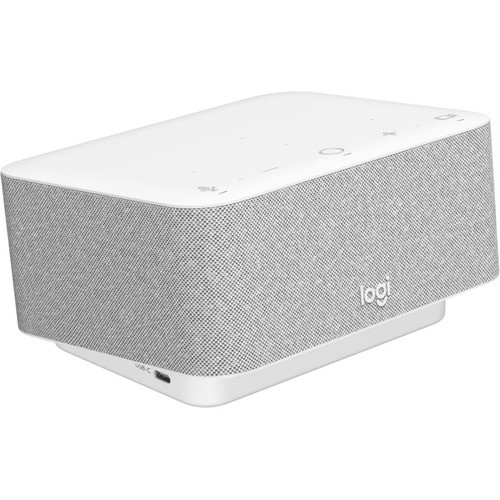


Logitech Logi Dock Docking Station - for Desktop PC/Tablet/Smartphone - 100 W - USB Type C - 2 Displays Supported - 4K - 3840 x 2160 - 5 x USB Ports - 3 x USB 3.1 Type-C Ports - 2 x USB Type-A Ports - USB Type-A - 4 x USB Type-C Ports (LOG986000031)
Logitech Logi Dock Docking Station - for Desktop PC/Tablet/Smartphone - 100 W - USB Type C - 2 Displays Supported - 4K - 3840 x 2160 - 5 x USB Ports - 3 x USB 3.1 Type-C Ports - 2 x USB Type-A Ports - USB Type-A - 4 x USB Type-C Ports (LOG986000031)
Part Number: 986000031
Condition: New
Availability:
Out of stock
Real time availability 
Notify Me

Best of Cleveland Award in the Computers category

Compsource is honored to be named to the Inc. 500|5000 list

Ranked among the top 500 companies

Microsoft authorized Education reseller

HP Qualified Supplies Partner

BBB Accredited Business Since 2000



- Shipping Insurance
- Price Match Guarantee
- Terms of Service Guarantee
- Identity Theft Protection
Product Specifications
Logitech Logi Dock Docking Station - for Desktop PC/Tablet/Smartphone - 100 W - USB Type C - 2 Displays Supported - 4K - 3840 x 2160 - 5 x USB Ports - 3 x USB 3.1 Type-C Ports - 2 x USB Type-A Ports - USB Type-A - 4 x USB Type-C Ports (LOG986000031)
UC Logi Dock, 1 HDMI/1 Displayport/2 USB A/3 USB C, White
Manufacturer Part Number: 986000031
"Logi Dock is an all-in-one docking station with one-touch meeting controls and a built-in speakerphone. It simplifies home office setup, reduces desktop clutter, and enhances productivity."
MANUFACTURER NAME: Logitech
MANUFACTURER PART NUMBER: 986000031
UPC EAN CODE: 097855172792
LANGUAGE: EN
MARKET:US
| General Information: | |
The Work From Home SuperHero Working from home shouldn't be a compromise. Logi Dock is an all-in-one docking station that simplifies home office setup, reduces desktop clutter, and helps remote workers feel more productive. Certified for leading video conferencing platforms and easy to set up, Logi Dock connects everything in one tidy unit that replaces the need for extra peripherals and eliminates a tangle of cables and wires. Work freely. Logi Dock connects and charges up to five USB peripherals and two monitors, replaces unneeded chargers and power cords, and makes desktop clutter disappear. Whether you use a Mac, PC, or Chromebook™ Logi Dock works with laptops that support USB-C with DisplayPort Alt Mode. With USB-C DP or Alt Mode, Logi Dock can provide up to 100W of power to charge laptops and connect video source and display devices such as external monitors., Logi Dock streamlines your home office so you can work more productively. Logi Dock is elegantly designed for any modern workspace, whether in an open space at home, a private office, or a focus room. | |
| Manufacturer | Logitech |
| Manufacturer Part Number | 986-000031 |
| Manufacturer Website Address | http://www.logitech.com |
| Brand Name | Logitech |
| Product Line | Logi Dock |
| Product Name | Logi Dock Docking Station |
| Product Type | Docking Station |
| Product UPC | 097855172792 |
| Technical Information: | |
| Connectivity Technology | Wired/Wireless |
| Number of Displays Supported | 2 |
| Supported Resolutions | 3840 x 2160 |
| Screen Mode Supported | 4K |
| Device Supported | Smartphone
Tablet Desktop PC |
| Interfaces/Ports: | |
| Host Interface | USB Type C |
| Total Number of USB Ports | 5 |
| Number of USB 3.1 Type-C Ports | 3 |
| Number of USB Type-C Ports | 4 |
| USB Type-C | Yes |
| USB Type-C Detail | 2 x USB 3.1 (5 Gbps) with 4.5W charging, 1 x USB 3.1 (5 Gbps) with 7.5W fast charging, 1 x USB-C Upstream |
| Number of USB Type-A Ports | 2 |
| USB Type-A | Yes |
| Number of DisplayPorts | 1 |
| DisplayPort | Yes |
| DisplayPort Version | 1.4 |
| Number of HDMI Ports | 1 |
| HDMI | Yes |
| Built-in Devices: | |
| Speakers | Yes |
| Software: | |
| Operating System Supported | Windows
macOS ChromeOS iOS Android |
| Power Description: | |
| Maximum Power Supply Wattage | 100 W |
| Physical Characteristics: | |
| Height | 3.34" |
| Width | 6.30" |
| Depth | 5.18" |
| Weight (Approximate) | 2.08 lb |
| Miscellaneous: | |
| What's in the box |
|
| Kensington Security Slot | Yes |
| Environmentally Friendly | Yes |
| Environmental Compliance | Restriction of Hazardous Substances (RoHS)
Waste Electrical and Electronic Equipment Directive (WEEE) |
| Warranty: | |
| Warranty | 2 Year |
Questions and Answers
Questions and Answers | Ask CompSource |
Shipping / Returns
Shipping
Ground =
16
(Delivery within 2-7 business days)
Two Day Air = 49
(Delivery within 2 business days)
Standard One Day = 74
(Delivery within next business day)
Priority = 99
(Delivery within next business morning)
U.S Mail Priority (AA,AE,AP only) = 54.67
FedEx International Economy (Canada only) = 109
Typically out of stock items are filled within 1 to 14 business days but can and may take longer.
Shipping dates are best estimates based on product location and may vary with holidays.
If product requires trucking, additional fees may apply.
* Some destinations are subject to Applicable State/Duty Taxes
Returns
CompSource realizes that every product may have different return guidelines. Please see the policy below regarding this item.
This Product Has Limited Exchange Privileges.
Limited returns within 30 days of purchase permitted on this product.
For support on this product, please contact Logitech. 8003088666 WWW.LOGITECH.COM
Logitech Company's Information

Click Logitech for all products
Local #: 8017865612
Toll Free #: 8003088666
Site: WWW.LOGITECH.COM
Accessories

Product Reviews
Overall Rating | Write a Review
|
|
Best Sellers
More Best Sellers




Recently Viewed





About Logitech
Logitech: Innovation, Quality, and Seamless Digital Experiences
Since 1981, Logitech has been at the forefront of personal peripherals, revolutionizing the way people interact with technology. Starting with the computer mouse, Logitech quickly became the global leader in PC navigation, continuously reinventing its products to meet the evolving needs of users.
Expanding Beyond the Mouse
Logitech’s expertise extends far beyond mice, offering a diverse portfolio of interface devices that bridge the gap between users and their digital world. Whether it’s gaming, digital music, home entertainment, or professional communication, Logitech designs products that enhance comfort, efficiency, and enjoyment.
Logitech’s Commitment to Innovation
With products available in almost every country, Logitech remains a leader in cutting-edge technology, focusing on:
- PC Navigation – Precision-engineered mice and trackpads
- Gaming Accessories – High-performance controllers, headsets, and keyboards
- Internet Communications – Crystal-clear webcams and audio solutions
- Digital Music & Home Entertainment – Premium speakers and immersive sound systems
Popular Logitech Categories at CompSource
At CompSource, we proudly carry a wide selection of Logitech’s best-selling peripherals, including:
- Pointing Devices (Mice) – Ergonomic, wireless, and gaming options
- Headsets & Earsets – Studio-quality sound and noise-canceling features
- Keyboards & Keypads – Mechanical, wireless, and illuminated designs
- Multimedia Speakers – High-fidelity audio for music and movies
- Webcams – HD video for streaming and professional meetings
- Gaming Controllers – Precision control for competitive gaming
- Keyboard & Mouse Combos – Seamless productivity solutions
Why Shop Logitech at CompSource?
- Expert Guidance – Our professionals help you find the best solution for your needs and budget
- Competitive Pricing – Get the best deals on Logitech’s top-rated products
- Personalized Support – Chat with us or call (800)-413-7361 for assistance
Upgrade your digital experience today with Logitech’s industry-leading peripherals—available at CompSource!
Learn more about Docking Stations
Mobile computing has become essential in today's world, why choose a laptop computer over of a tablet or a smartphone? For one thing, notebooks include a keyboard, considered by many to be quicker and easier than a touchpad for computing tasks. Laptops also provide a larger storage capacity, with most models starting at 250GB. Beyond that, a notebook often has a CD/DVD drive, a larger screen, and the ability to run high-powered, full-featured software. Additionally, many notebooks offer USB ports to plug in peripherals like a wired or USB mouse, HDMI ports for use with a projector or separate monitor, Ethernet ports, SD memory card slots and other universal ports.
With today's computing power most people won't see a reason to go back to a desktop once they witness the portability and convenience of a notebook.
A few exceptions to that rule might be gaming, however some manufacturers are putting this amazing needed power into the form factor of a notebook and we now carry Gaming notebooks as well!
Choosing the right laptop can feel like a daunting task. There are Ultrabooks which are very powerful, yet ultra lightweight or 2 in 1 Notebooks which can be used as a traditional notebook or a tablet for even more mobility.
Choosing the best notebook for your needs.
If you are a professional who may need to edit video, or create special effects, animation, mix audio or possibly render CAD drawings, Mobile Workstation could be the right choice for you. Mobile workstations feature true desktop power, faster hard drives and larger memory capacity than general-use notebooks.
However, If you're like most of us you may only need a notebook for relatively simple tasks such as web searches, homework, or listening to music, etc. if this is the case you may not need as much power and can save some money by choosing a Netbook or a Chromebook. These will be the most economical versions but are typically less powerful, smaller screen sizes or with a Chromebook, not Windows based.
Things to consider
You'll want to consider screen size and resolution — notebooks with HD, good for surfing the Web, to 4K Ultra HD, which creates the rich colors and images you want for gaming or editing. Weight is also something to keep in mind. As you would expect, a larger screen and more capacity translates to more weight. Streamlined options start at under 3 lbs., with the best personal computer notebook for gamers usually weighing in at over 6 lbs. If you really want to go lightweight consider a Ultrabook! Also consider Hard drive size as well as what type of drive you technology you need. Standard Hard Drives, or platter drives are slower but typically less expensive and often times have a larger capacity. Solid State Drives are much faster and typically more expensive but they also have additional benefits, they run cool, they do not use as much power and have no moving parts making it much more quite.
Notebook Brands You'll Love
Choosing the best laptop can be confusing due to the multiple options with overlapping features from a variety of brands. CompSource offers notebook models from the brands we trust to provide quality components and the latest technology. So whether you are looking to purchase a Dell laptop, or one of our favorites Acer Notebooks or you can checkout the great Microsoft Surface Book with touch screen,
CompSource is here to help you decide. We have conveniently created this link that will show you all the different notebook options, we have a great selection at competitive prices. You can also Chat with us or give our professionals a quick phone call (800)-413-7361, we can assist with the best solution for your needs and budget.
I"m very pleased with the entire ordering process. These people were professional, and provided timely, and accurate information. Order shipped the day after I placed. Thanks for the great service! specialtembrdryMore Reviews