
 Previous
Next
Previous
Next


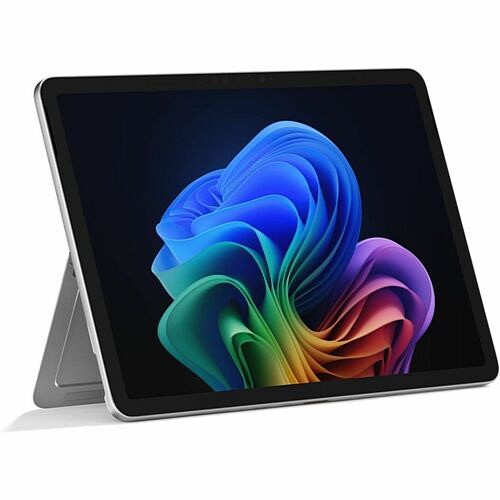
Microsoft Surface Pro 12 (2025) Copilot+ PC Tablet - 12" - Qualcomm Snapdragon X Plus - 16 GB - 256 GB Storage - Windows 11 Home - Platinum - Oryon Octa-core (8 Core) - 400 Nit - PixelSense Display - 5 Megapixel Front Camera (EP2-33670)
Microsoft Surface Pro 12 (2025) Copilot+ PC Tablet - 12" - Qualcomm Snapdragon X Plus - 16 GB - 256 GB Storage - Windows 11 Home - Platinum - Oryon Octa-core (8 Core) - 400 Nit - PixelSense Display - 5 Megapixel Front Camera (EP2-33670)
Part Number: EP2-33670
Condition: New
Availability:
Out of stock
Real time availability 
Notify Me

Best of Cleveland Award in the Computers category

Compsource is honored to be named to the Inc. 500|5000 list

Ranked among the top 500 companies

Microsoft authorized Education reseller

HP Qualified Supplies Partner

BBB Accredited Business Since 2000



- Shipping Insurance
- Price Match Guarantee
- Terms of Service Guarantee
- Identity Theft Protection
Product Specifications
Microsoft Surface Pro 12 (2025) Copilot+ PC Tablet - 12" - Qualcomm Snapdragon X Plus - 16 GB - 256 GB Storage - Windows 11 Home - Platinum - Oryon Octa-core (8 Core) - 400 Nit - PixelSense Display - 5 Megapixel Front Camera (EP2-33670)
MICROSOFT SURFACE PRO CORE SYST - SNAPDRAGON X PLUS 256GB UFS 16GB
Manufacturer Part Number: EP2-33670
MANUFACTURER NAME: Microsoft
MANUFACTURER PART NUMBER: EP2-33670
UPC EAN CODE: 196388550555
LANGUAGE: EN
MARKET:US
| General Information: | |
Built for versatility Available with 12-inch and 13-inch PixelSense displays, Surface Pro devices give you AI-accelerated experiences and seamlessly attach Surface Pro keyboards for a premium typing and scrolling experience. Landscape or portrait Easily switch orientation for browsing, taking notes, or creating. Convenient, secure storage Your Slim Pen stays secured, charged, and easily accessible on the back of Surface Pro. Tablet to laptop in a click Easily transform your Surface Pro to a full laptop with Surface Keyboard. Surface Pro, 12-inch | 16 All-day battery life Less downtime and more power, with up to 16 hours of video playback. 50% Faster performance Over 50% faster than Surface Pro 9. Stunning, hands-on display 12-inch PixelSense touchscreen display designed to use with touch and pen. Do more with AI Supercharge your productivity and creativity with 45 TOPS. Reimagined with a smooth-matte palm rest, sturdy wedge design, and dynamic hinge, Surface Pro is great for typing anywhere, even on your lap. Incredible typing experience Work anywhere with better typing and 360° rotation. The new 12-inch Surface Pro is durable, easy to clean, and ideal for travel or the coffee shop. Talk to your AI companion Find Copilot on your PC or mobile device to get help when you need it using text or your voice. For work or everyday tasks When you want to organize, iterate, research, or refine, Copilot works with you to create your best results. Make plans or get creative Describe and find your perfect vacation getaway. Deep dive into a new topic. Brainstorm gift ideas or your next theme party. Whatever you ask, Copilot's there to help. Built-in AI Meet your new favorite Copilot+ PC experiences on Surface Pro to boost your productivity and unleash new creativity. Find what's on your mind Search using everyday language or describe what you're looking for to locate files and images on your Surface PC. Click to Do (preview) Save time and create the ultimate shortcut to productivity and creativity with quick actions over images or text at your command. Recall (preview) Searching for a document, email, or web page on your PC can be time-consuming. Use the explorable timeline of your PC's history to retrieve the moment you saw it. Restyle Image in Photos Add unique AI-generated styles to your photos by choosing curated options and adjusting creativity, or by creating custom styles with a text description. Microsoft 365 Copilot Generate ideas with AI while writing in Word, transform documents into decks in PowerPoint, and more when you use Copilot Pro, with Microsoft 365. All your favorite apps Create, stream, chat, or work on your favorite apps on Surface Pro. Find and download what you need at the Microsoft Store. Precise inking, natural feeling Get a natural writing experience when taking handwritten notes, designing illustrations, editing videos, or annotating text with the ultra-precise Surface Slim Pen. Precise, responsive input Whether drawing, taking notes, or navigating on your Surface touchscreen, Surface Slim Pen gives you functionality and flexibility. | |
| Manufacturer | Microsoft Corporation |
| Manufacturer Part Number | EP2-33670 |
| Manufacturer Website Address | http://www.microsoft.com |
| Brand Name | Microsoft |
| Product Line | Surface Pro 12 (2025) |
| Copilot+ PC | Yes |
| Product Name | Surface Pro 12 (2025) Tablet |
| Product Type | Tablet |
| Product UPC | 196388550555 |
| Technical Information: | |
| AI-powered | Yes |
| Processor: | |
| Processor Manufacturer | Qualcomm |
| Processor Type | Oryon |
| Processor Core | Octa-core (8 Core) |
| NPU Manufacturer | Qualcomm |
| NPU Name | Hexagon |
| NPU Performance | 45 TOPS |
| Chipset: | |
| Chipset Manufacturer | Qualcomm |
| Chipset Model | Snapdragon X Plus |
| Memory: | |
| Standard Memory | 16 GB |
| Memory Technology | LPDDR5X |
| Storage: | |
| Flash Memory Capacity | 256 GB |
| Display & Graphics: | |
| Screen Size | 12" |
| Display Screen Type | LCD |
| Display Screen Technology | PixelSense |
| Aspect Ratio | 3:2 |
| Color Gamut | sRGB |
| Brightness | 400 Nit |
| Contrast Ratio | 1200:1 |
| Graphics Controller Manufacturer | Qualcomm |
| Graphics Memory Technology | LPDDR5X |
| Graphics Memory Accessibility | Shared |
| Network & Communication: | |
| WWAN Supported | No |
| Wireless Connectivity Technology | Wi-Fi |
| Cellular Phone Capability | No |
| Wireless LAN | Yes |
| Wireless LAN Standard | IEEE 802.11be |
| Bluetooth | Yes |
| Interfaces/Ports: | |
| USB Type-C | Yes |
| USB Type-C Detail | 2 x USB-C / USB 3.2 ports |
| DisplayPort | Yes |
| Charging Interface | USB Type C |
| Built-in Devices: | |
| Sensor Type | Accelerometer
Gyroscope Magnetometer Color Sensor |
| Front Camera | Yes |
| Front Camera Resolution | 5 Megapixel |
| Rear Camera | Yes |
| Rear Camera Resolution | 10 Megapixel |
| Operating System: | |
| Operating System Platform | Windows |
| Operating System | Windows 11 Home |
| Power Description: | |
| Maximum Power Supply Wattage | 45 W |
| USB Power Delivery Support | Yes |
| Physical Characteristics: | |
| Color Family | Gray |
| Product Color | Platinum |
| Form Factor | Slate |
| Height | 0.3" |
| Width | 7.5" |
| Depth | 10.8" |
| Weight (Approximate) | 1.51 lb |
| Miscellaneous: | |
| What's in the box |
|
| Features | Volume Control Button
Built-in Kickstand Face Recognition Trusted Platform Module (TPM) |
| Charger Included | No |
| Windows Hello Compatible | Yes |
| Energy Star | Yes |
| Warranty: | |
| Warranty | 1 Year |
Questions and Answers
Questions and Answers | Ask CompSource |
Shipping / Returns
Shipping
Ground =
FREE
(Delivery within 2-7 business days)
Two Day Air = $25.00
(Delivery within 2 business days)
Standard One Day = $35.00
(Delivery within next business day)
Priority = $45.00
(Delivery within next business morning)
U.S Mail Priority (AA,AE,AP only) = $30.00
FedEx International Economy (Canada only) = $85.00
Typically out of stock items are filled within 1 to 14 business days but can and may take longer.
Shipping dates are best estimates based on product location and may vary with holidays.
If product requires trucking, additional fees may apply.
* Some destinations are subject to Applicable State/Duty Taxes
Returns
CompSource realizes that every product may have different return guidelines. Please see the policy below regarding this item.
This Product Has Limited Exchange Privileges.
Please call for return guidelines.
For support on this product, please contact Microsoft. 1-800-642-7676 www.microsoft.com
Microsoft Company's Information

Click Microsoft for all products
Local #: 206-882-8080
Toll Free #: 1-800-642-7676
Tech Support #: 206-635-3313
Site: www.microsoft.com
Accessories


Product Reviews
Overall Rating | Write a Review
|
|
Best Sellers
More Best Sellers




Recently Viewed



About Microsoft
Our mission is to empower every person and every organization on the planet to achieve more.
What Microsoft Value's
Innovation
Learn about innovations from our computer science research organization. With more than 1,000 researchers in our labs, it;s one of the largest in the world.
Diversity and inclusion
Explore how we maximize every person's contribution from our employees to our customers' so that the way we innovate naturally includes diverse thought.
Corporate social responsibility
See how we work to be a responsible partner to those who place their trust in us, conducting business in a way that is inclusive, transparent, and respectful of human rights.
Philanthropies
Find out how we empower people by investing technology, money, employee talent, and the company;' voice in programs that promote digital inclusion.
Environment
Discover how we lead the way in sustainability and use our technologies to minimize the impact of our operations and products.
Trustworthy Computing
Check out how we deliver secure, private, and reliable computing experiences based on sound business practices.
Check out just some of the great products CompSource carries for Microsoft;
Microsoft Office, Operating Systems, Surface notebooks and more!
Learn more about Tablet PCs
Android tablets are portable devices that run on the Android operating system, which is a mobile operating system developed by Google. These tablets are designed to be used for a variety of purposes, including browsing the internet, reading and sending emails, watching movies and TV shows, playing games, and more.
Tablet PCs, on the other hand, are devices that are designed to be used as a computer, with the ability to run full desktop operating systems such as Windows or macOS. These devices are typically larger and more powerful than android tablets, and are often used for productivity tasks such as word processing, spreadsheet creation, and photo editing.
Both android tablets and tablet PCs can be used to access the internet and run apps, but tablet PCs tend to have more advanced hardware and software capabilities, making them more suitable for more demanding tasks. Additionally, android tablets are often more portable and lightweight than tablet PCs, making them easier to carry around and use on the go.
What to Know Before Buying a Tablet
A tablet is a portable device, typically equipped with a touch-sensitive screen, which is used for accessing and interacting with various types of electronic content, such as web pages, videos, and social media. A tablet computer, or tablet PC, is a type of mobile computer that combines the features of a personal computer with the portability and convenience of a smartphone. Tablet PCs are typically equipped with a larger screen and more powerful hardware than a smartphone, and are designed for use as a primary computing device. They can run a wide variety of software applications, including productivity tools, games, and media players. Some tablet PCs are designed with specific features or capabilities, such as support for stylus input or the ability to function as a laptop or desktop computer when paired with a keyboard accessory.
There are several benefits to using a tablet, including:
Portability: Tablets are smaller and lighter than laptops, making them easy to carry and use on-the-go.
Multitasking: Most tablets have the ability to run multiple apps at the same time, allowing users to multitask and be more productive.
Long battery life: Tablets have longer battery life than laptops, allowing users to use them for extended periods of time without needing to recharge.
Touchscreen capabilities: Tablets have touchscreen capabilities, making them easy to navigate and interact with.
Access to a wide range of apps: Tablets have access to a wide range of apps, from productivity tools to games and entertainment.
When choosing the best tablet, there are a few key factors to consider:Operating system: Choose a tablet with an operating system that you are comfortable using and offers the apps and features you need.
Size and weight: Consider the size and weight of the tablet, as well as its portability and ease of use.
Battery life: Look for a tablet with a long battery life to ensure you can use it throughout the day without needing to recharge.
Storage: Consider the amount of storage the tablet has, as well as its ability to expand via external storage options.
Price: Determine your budget and look for a tablet that offers the features and capabilities you need within that budget.
Choosing the best tablet can be confusing due to the multiple options with overlapping features from a variety of brands. CompSource offers tablet models from the brands we trust to provide quality components and the latest technology. When choosing the best tablet, consider factors such as the operating system, screen size, battery life, and storage capacity. Also, consider the specific needs and uses for the tablet, such as for work or entertainment, or possibly a rugged tablet to ensure it meets your requirements. Additionally, consider the brand and reputation of the tablet, as well as its price and any available discounts or promotions, we are here to help.
CompSource is here to help you decide. We have conveniently created this Link, that will show you all the different tablet options, we have a great selection at competitive prices. You can also Chat with us or give our professionals a quick phone call (800)-413-7361, we can assist with the best solution for your needs and budget.
Site is well organized prices are good and delivery was great DinoMore Reviews