



 Previous
Next
Previous
Next


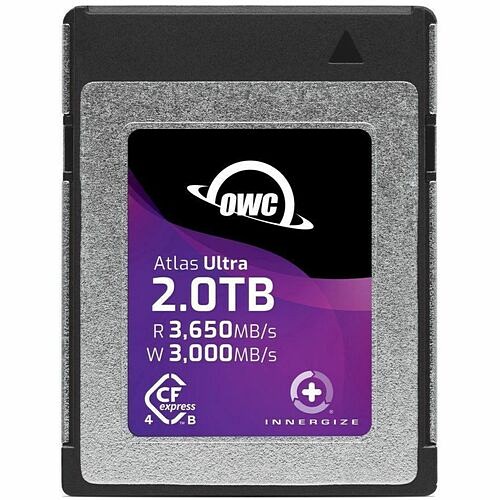
OWC 2TB Atlas Ultra CFexpress Type B 4.0 Memory Card - Up to 3000 MB/s Write and 3650 MB/s Read Speeds, 1500MB/s Minimum Sustained Write Speed - RED Certified - 3 Year Limited Warranty - TAA Compliant (OWCCFXB4U02000)
OWC 2TB Atlas Ultra CFexpress Type B 4.0 Memory Card - Up to 3000 MB/s Write and 3650 MB/s Read Speeds, 1500MB/s Minimum Sustained Write Speed - RED Certified - 3 Year Limited Warranty - TAA Compliant (OWCCFXB4U02000)
Part Number: OWCCFXB4U02000
Condition: New
Availability:
Out of stock
Real time availability 
Notify Me

Best of Cleveland Award in the Computers category

Compsource is honored to be named to the Inc. 500|5000 list

Ranked among the top 500 companies

Microsoft authorized Education reseller

HP Qualified Supplies Partner

BBB Accredited Business Since 2000



- Shipping Insurance
- Price Match Guarantee
- Terms of Service Guarantee
- Identity Theft Protection
Product Specifications
OWC 2TB Atlas Ultra CFexpress Type B 4.0 Memory Card - Up to 3000 MB/s Write and 3650 MB/s Read Speeds, 1500MB/s Minimum Sustained Write Speed - RED Certified - 3 Year Limited Warranty - TAA Compliant (OWCCFXB4U02000)
OWC ATLAS ULTRA 2TB CFEXPRESS 4.0 TYPE B MEMORY CARD - PROFESSIONAL GRADE, HIGH
Manufacturer Part Number: OWCCFXB4U02000
Up to 3000 MB s Write and 3650 MB s Read Speeds, 1500MB s Minimum Sustained Write Speed RED Certified 3 Year Limited Warranty TAA Compliant
MANUFACTURER NAME: Owc
MANUFACTURER PART NUMBER: OWCCFXB4U02000
UPC EAN CODE: 810144629704
LANGUAGE: EN
MARKET:US
| General Information: | |
OWC Atlas Ultra CFexpress High-performance, highest quality memory card for the most demanding video recording uses of professional filmmakers and continuous burst mode shooting by advanced photographers. The Fastest, Most Reliable CFexpress Card When you need the fastest, most reliable CFexpress card, the Atlas Ultra CFexpress is ready to take you to the edge. With incredibly high minimum sustained write speeds up to 1500MB/s, this is the perfect media card for pro filmmakers or extreme action photographers to unleash their cameras capabilities. Professional filmmakers can capture amazingly life-like 8K RAW video in slow-motion with cinema cameras like the Nikon Z9, Canon R5C, and RED V-Raptor. As a testament to its quality, the Atlas Ultra CFexpress is one of only several media cards that meets RED Digital Cinema's stringent test standards and has been officially approved for use with their RED V-Raptor Cinema camera. | |
| Manufacturer | Other World Computing |
| Manufacturer Part Number | OWCCFXB4U02000 |
| Manufacturer Website Address | https://www.owc.com/ |
| Brand Name | OWC |
| Product Line | Atlas Ultra |
| Product Name | High-Performance CFexpress 4.0 Type B Memory Card |
| Packaged Quantity | 1 |
| Product Type | CFexpress Card Type B |
| Product UPC | 810144629704 |
| Technical Information: | |
| Storage Capacity | 2 TB |
| Maximum Read Speed | 3.56 GB/s |
| Maximum Write Speed | 2.93 GB/s |
| Physical Characteristics: | |
| Width | 0.9" |
| Thickness | 78.7 mil |
| Length | 1.3" |
| Miscellaneous: | |
| What's in the box |
|
| TAA Compliant | Yes |
| Warranty: | |
| Warranty | 3 Year |
Questions and Answers
Questions and Answers | Ask CompSource |
Shipping / Returns
Shipping
Ground =
FREE
(Delivery within 2-7 business days)
Two Day Air = $25.00
(Delivery within 2 business days)
Standard One Day = $35.00
(Delivery within next business day)
Priority = $45.00
(Delivery within next business morning)
U.S Mail Priority (AA,AE,AP only) = $30.00
FedEx International Economy (Canada only) = $85.00
Typically out of stock items are filled within 1 to 14 business days but can and may take longer.
Shipping dates are best estimates based on product location and may vary with holidays.
If product requires trucking, additional fees may apply.
* Some destinations are subject to Applicable State/Duty Taxes
Returns
CompSource realizes that every product may have different return guidelines. Please see the policy below regarding this item.
This Product Has Limited Exchange Privileges.
Limited returns within 30 days of purchase permitted on this product.
For support on this product, please contact Owc.
Owc Company's Information

Click Owc for all products
Accessories

Product Reviews
Overall Rating | Write a Review
|
|
Best Sellers
More Best Sellers




Recently Viewed






About Owc
Why Buy OWC Products from Compsource
Other World Computing (OWC) has been a trusted name in the Apple ecosystem since 1988. Founded by Larry O’Connor in Woodstock, Illinois, OWC has grown into a global leader in Mac and iOS upgrades, offering over 3,000 products and shipping to more than 190 countries.
What OWC Offers
- High-performance SSDs and memory upgrades for Macs
- External storage solutions including RAID arrays and portable drives
- Docking stations, cables, and accessories for Apple devices
- Software tools and educational resources to empower DIY upgrades
Why Choose OWC?
OWC is known for its commitment to quality, innovation, and sustainability. Their LEED Platinum-certified campus runs on renewable energy, including solar arrays and a wind turbine that makes them a net energy producer. Their products are designed and assembled in the USA, and they offer industry-leading warranties and customer support.
Why Buy OWC from Compsource?
- Authorized Reseller: Compsource is a trusted partner offering genuine OWC products.
- Competitive Pricing: Get the best deals on OWC upgrades and accessories.
- Fast Shipping: Nationwide delivery with excellent customer service.
- Expert Support: Our team helps you choose the right OWC solution for your needs.
We want this to be as easy and stress-free as possible. CompSource is here to help with your OWC purchase. We're here to help you decide. Chat with us or give our professionals a quick phone call (800)-413-7361, we can assist with the best OWC solution for your needs and budget.
Here are our most popular categories;About the Author

Mason Maynard
Mason Maynard is a people-oriented individual who finds joy in spending quality time with friends and family, valuing strong personal connections. With a strong interest in Marketing and Sales, Mason thrives on creating impactful strategies that engage audiences and drive meaningful results. Mason is passionate about innovation, business growth, and delivering top-tier customer service.
Connect with Mason on: LinkedIn