
 Previous
Next
Previous
Next


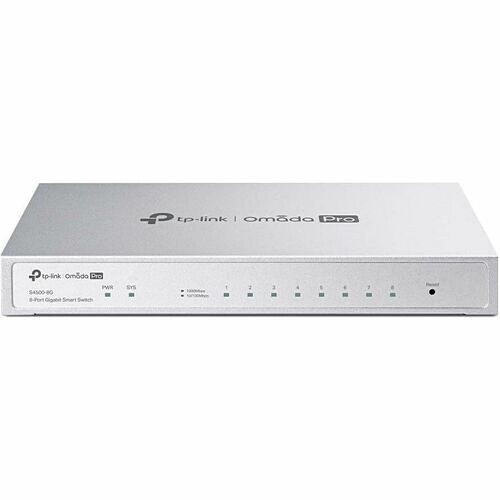


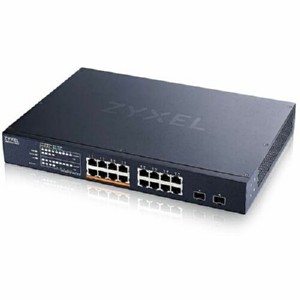
Omada Pro Omada Pro 8-Port Gigabit Smart Switch - 8 Ports - Manageable - Gigabit Ethernet - 10/100/1000Base-T - 2 Layer Supported - 6.40 W Power Consumption - Twisted Pair - Desktop, Wall Mountable (S4500-8G)
Omada Pro Omada Pro 8-Port Gigabit Smart Switch - 8 Ports - Manageable - Gigabit Ethernet - 10/100/1000Base-T - 2 Layer Supported - 6.40 W Power Consumption - Twisted Pair - Desktop, Wall Mountable (S4500-8G)
Part Number: S4500-8G
Condition: New
Availability:
Out of stock
Real time availability 
Notify Me

Best of Cleveland Award in the Computers category

Compsource is honored to be named to the Inc. 500|5000 list

Ranked among the top 500 companies

Microsoft authorized Education reseller

HP Qualified Supplies Partner

BBB Accredited Business Since 2000



- Shipping Insurance
- Price Match Guarantee
- Terms of Service Guarantee
- Identity Theft Protection
Product Specifications
Omada Pro Omada Pro 8-Port Gigabit Smart Switch - 8 Ports - Manageable - Gigabit Ethernet - 10/100/1000Base-T - 2 Layer Supported - 6.40 W Power Consumption - Twisted Pair - Desktop, Wall Mountable (S4500-8G)
Omada Pro 8P Gig Smart Sw
Manufacturer Part Number: S4500-8G
TP-Link S4500-8G
The TP-Link S4500-8G is a managed Gigabit Ethernet switch designed for enterprise and small business network infrastructure. The device provides high-speed switching, VLAN support, and network management features.
Product Type
Managed Layer 2 Gigabit Ethernet switch used to connect network devices within a local area network while supporting advanced configuration features such as VLAN segmentation and traffic prioritization.
Power Information
- Powered by standard AC mains electricity.
- Internal power supply distributes power to switching hardware.
- Rear panel AC power connector accepts standard power cable.
- Designed for continuous network operation.
Operation Notes
- Connect AC power cable to a grounded outlet.
- Connect Ethernet cables from network devices to RJ45 ports.
- Access the management interface using configured IP address.
- Configure VLANs, QoS, and network security settings.
- Install in a well ventilated network rack or cabinet.
Common Service Points
- No power: verify AC cable and electrical outlet.
- No network link: confirm Ethernet cable and device power.
- Slow network speed: ensure cables support gigabit speeds.
- Cannot access management interface: verify IP configuration.
- Overheating: ensure ventilation openings are unobstructed.
Parts Location Notes
- Eight RJ45 Gigabit Ethernet ports located on front panel.
- Status LEDs above each port indicate link activity.
- Rear panel includes AC power connector.
- Ventilation openings located along chassis sides.
Physical Controls
LED indicators display power status, port activity, and system operation. Some configurations may include a reset button used to restore factory settings.
Frequently Asked Questions
What is the TP-Link S4500-8G?
The TP-Link S4500-8G is an enterprise class 8-port Gigabit Ethernet managed network switch designed to provide reliable LAN connectivity and advanced network configuration capabilities.
How is the TP-Link S4500-8G powered?
The switch is powered using standard AC mains electricity through an internal power supply connected with a power cable.
How do you access the management interface?
Administrators can access the management interface using a web browser, command line interface, or network management software depending on the configuration.
What devices can connect to the TP-Link S4500-8G?
Devices such as computers, servers, routers, and wireless access points can connect using standard Ethernet cables.
MANUFACTURER NAME: Tp Link
MANUFACTURER PART NUMBER: S4500-8G
UPC EAN CODE: 840030711336
LANGUAGE: EN
MARKET:US
| General Information: | |
What This Product Does S4500-8G is an enterprise-level switch equipped with eight RJ45 ports (10/100/1000 Mbps). High-performance static routing, enterprise-level QoS, advanced security features, a selection of Layer 2 management options, and integration into the Omada Pro SDN (Software-Defined Networking) make S4500-8G an excellent choice for the access layer of business networking. Secure NetworkingSecurity features include IP-MAC-Port Binding and VLAN Binding, Port Security, Storm Control, and DHCP Snooping to defend against a range of network threats. An integrated list of common DoS attacks is available, making it easier than ever to prevent them. In addition, the Access Control Lists (ACL, L2 to L4) feature restricts access to sensitive network resources by denying packets based on source and destination MAC address, IP address, TCP/UDP ports, or VLAN ID. Users' network access can be controlled via 802.1X authentication, which works with a RADIUS/Tacacs+ server to grant access only when valid user credentials are provided. Advanced QoSLeveraging IP, MAC, TCP, and UDP identifiers, our QoS feature ensures seamless voice and video transmission-even when bandwidth is in short supply. Abundant L2 and L2+ FeaturesS4500-8G supports a complete lineup of L2 features, including 802.1Q VLAN, Port Mirroring, STP/RSTP/MSTP, Link Aggregation Control Protocol, and 802.3x Flow Control. Advanced IGMP Snooping ensures the switch intelligently forwards multicast streams to only the appropriate subscribers, cutting out unnecessary traffic, while IGMP throttling and filtering restrict each subscriber on a port level to prevent unauthorized multicast access. Static Routing, an L2+ feature, is a simple way of segmenting the network and internally routing traffic through the switch for improved efficiency. IPv6 SupportIPv6 functions such as Dual IPv4/IPv6 Stack, MLD Snooping, IPv6 ACL, DHCPv6 Snooping, IPv6 Interface, Path Maximum Transmission Unit (PMTU) Discovery, and IPv6 Neighbor Discovery guarantee that your network is ready for the Next Generation Network (NGN) without upgrading your hardware. Omada Pro IntegrationIntegration into the Omada Pro system brings centralized cloud management and a series of management features such as Zero-Touch Provisioning (ZTP) and Intelligent Anomaly Detection.* Omada Pro's Software Defined Networking (SDN) platform integrates network devices, including access points, switches, and routers, providing 100% centralized cloud management. Omada Pro creates a highly scalable network-all controlled from a single interface. Apart from the ability to be centrally managed via Omada Pro controllers, S4500-8G simplifies management via an intuitive web-based Graphical User Interface (GUI) or an industry-standard Command Line Interface (CLI). For both management methods, traffic is protected through SSL or SSH encryption. SNMP (v1/v2c/v3) and RMON support enable the switch to be polled for valuable status information and to send traps for abnormal events. | |
| Manufacturer | TP-LINK Technologies Co., Ltd |
| Manufacturer Part Number | S4500-8G |
| Manufacturer Website Address | http://www.tp-link.com/us |
| Brand Name | Omada Pro |
| Product Series | 4500 |
| Product Name | Omada Pro 8-Port Gigabit Smart Switch |
| Product Type | Ethernet Switch |
| Product UPC | 840030711336 |
| Technical Information: | |
| Features | Fanless |
| Interfaces/Ports: | |
| Total Number of Network Ports | 8 |
| Network (RJ-45) | Yes |
| Port/Expansion Slot Details | 8 × 10/100/1000BASE-T RJ-45 Network Ports |
| Media & Performance: | |
| Media Type Supported | Twisted Pair |
| Ethernet Technology | Gigabit Ethernet |
| Network Technology | 10/100/1000Base-T |
| Maximum Data Transfer Rate | 125 MB/s |
| Network & Communication: | |
| Layer Supported | 2 |
| Networking Standards | IEEE 802.3i
IEEE 802.3u IEEE 802.3ab IEEE 802.3ad IEEE 802.3x IEEE 802.1D IEEE 802.1s IEEE 802.1w IEEE 802.1Q IEEE 802.1p IEEE 802.1x |
| Management & Protocols: | |
| Manageable | Yes |
| Power Description: | |
| Input Voltage | 12 V DC |
| Power Source | Power Adapter |
| Power Consumption | 6.40 W |
| Physical Characteristics: | |
| Product Color | Gray |
| Form Factor | Desktop
Wall Mountable |
| Height | 1" |
| Width | 8.2" |
| Depth | 4.9" |
Questions and Answers
Questions and Answers | Ask CompSource |
Shipping / Returns
Shipping
Ground =
FREE
(Delivery within 2-7 business days)
Two Day Air = $27.00
(Delivery within 2 business days)
Priority = $70.00
(Delivery within next business morning)
U.S Mail Priority (AA,AE,AP only) = $34.00
FedEx International Economy (Canada only) = $87.00
Typically out of stock items are filled within 1 to 14 business days but can and may take longer.
Shipping dates are best estimates based on product location and may vary with holidays.
If product requires trucking, additional fees may apply.
* Some destinations are subject to Applicable State/Duty Taxes
Returns
CompSource realizes that every product may have different return guidelines. Please see the policy below regarding this item.
This Product Has Limited Exchange Privileges.
Limited returns within 30 days of purchase permitted on this product.
For support on this product, please contact Tp Link. http://www.tp-link.com/us/
Tp Link Company's Information

Click Tp Link for all products
Local #: (626) 333-0234
Accessories




Product Reviews
Overall Rating | Write a Review
|
|
Best Sellers
More Best Sellers




Recently Viewed



About Tp Link
About TP-Link
TP-Link was founded in 1996 by two brothers, to produce and market a network card they had developed. The company name was based on the concept of "twisted pair link", a kind of electromagnetic cabling, hence the "TP" in the company name., TP-Link is a global provider of reliable networking devices and accessories, involved in all aspects of everyday life. The company is consistently ranked by analyst firm IDC as the No. 1 provider of Wi-Fi devices*, supplying distribution to more than 170 countries and serving billions of people worldwide.
There are several reasons why someone might want to buy from TP-Link:
Reputation for Quality: TP-Link is a well-established brand in the networking industry and has a good reputation for producing quality products. The company has won many awards and has received positive reviews from customers and experts alike.
Broad Product Range: TP-Link offers a wide range of networking products, including routers, switches, range extenders, powerline adapters, network adapters, and more. This means that customers can find a solution that meets their specific needs and budget.
Affordable Pricing: TP-Link products are often priced lower than those of other networking companies, making them a great value for customers who want quality products at an affordable price.
Easy to Use: TP-Link products are known for being user-friendly and easy to set up, making them a good choice for customers who are not tech-savvy.
As for the company itself, TP-Link was founded in 1996 and is headquartered in Shenzhen, China. It is one of the world's leading providers of networking products and has a presence in more than 170 countries. TP-Link is committed to producing innovative and reliable products that meet the evolving needs of customers in the digital age. The company has won numerous awards for its products and has been recognized as one of the top networking companies in the world.
.TP-Link products include Wireless Routers, Switches & Bridges, Wireless Access Points, Powerline Network Adapters, Wireless NICs & Adapters, Routers & Gateways, Power Injectors/Splitters, Surveillance/Network Cameras, Antennas, and even Smart Light Bulbs and Smart Dimmer Switches. TP-Link also manufactured the OnHub router for Google. TP-Link also manufactures smart home devices under their Kasa product line.
We want your experience to be as easy and stress-free as possible. CompSource is here to help you decide on your TP-Link purchase. Chat with us or give our professionals a quick phone call (800)-413-7361, we can assist with the best solution for your needs and budget.
Learn more about Switches & Bridges
Network Switch Buying Guide
Connect Multiple Devices to a Network and Route Data to Designated Devices
What is a network switch and what does it do?
A network switch connects devices to a local area network (LAN) and allows the devices to communicate over the network. For example, you can connect computers, printers and servers to the same network switch and route data between them. Unlike an Ethernet hub, which transmits the same data through every output, a network switch sends data only to the devices designated to receive it. This improves the efficiency and potential throughput of the network.

Are there different types of network switches?
There are two main types of network switches, unmanaged and managed. The essential difference is the capability to configure the operation of a managed switch to customize and optimize network traffic for specific applications.
Unmanaged Switches
- Offer plug-and-play functionality
- Switch operation cannot be modified
- CompSource offers desktop and rack-mount unmanaged switches
Managed Switches
- Provide the ability to manage, prioritize and monitor LAN traffic
- Offer one or more ways to modify switch operation
- CompSource offers smart managed switches that feature an RJ45 console port and command line interface (CLI)
Where do you place network switches?
Network switches are usually placed on a desk or table, mounted on a wall, or mounted in a rack. CompSource offers unmanaged desktop switches (with metal or plastic housing) and both unmanaged and managed rack-mount switches with metal housing and a built-in PDU (Gigabit Ethernet Switch PDU Combos).

What is a Gigabit Ethernet Switch PDU Combo?
CompSource offers an exclusive line of unmanaged and managed Gigabit Ethernet switches that have Power over Ethernet (PoE).

Factors to Consider
Does your application require a managed switch?
If your application involves controlling network traffic, you will need the features of a managed switch. The following are some examples of tasks that require a managed switch:
- Controlling access between departments within your LAN
- Running many bandwidth-intensive applications simultaneously
- Giving important data greater priority in your LAN
- Improving the performance of a busy network
- Implementing VoIP, wireless LANs or other advanced services
How many devices do you need to connect to your network?
Make sure you select a switch with enough Gigabit (10/100/1000 Mbps) Ethernet ports for the devices you want to connect to your network. If you think you'll add more devices in the future, choose a switch that will give your network room to grow.

Do you need to connect multiple network switches?
If you plan to connect multiple network switches, look for models with SFP uplink ports (also known as Mini-GBIC ports). SFP uplink ports are connection points for SFP (small form-factor pluggable) modules that allow the switch to uplink to other switches using optical fiber cabling.
Power over Ethernet (PoE) uses existing network cables to power connected devices, such as VoIP phones, wireless access points and surveillance cameras. If you need this functionality, look for a switch with Gigabit Ethernet ports that support PoE. Make sure the power per port (in watts) and the total power budget of the PoE ports meet the needs of your electronic devices.
CompSource will educate and help make this process enjoyable and easy.
Whether you're planning on using your network for basic home tasks or enterprise level security. You can tell our trained sales professionals your needs, and we'll make custom recommendations to suit your specifications and budget. Our reps have extensive knowledge and love to share. We educate, not sell, CompSource makes sure you buy what you need and not waste money on what you don't. As with every decision we never push, it's up to you when, and if you make a purchase.
CompSource has a great technical staff that can help with a solution for your exact needs.
Chat with us or give our professionals a quick phone call (800)-413-7361.
There was a problem with my credit card information (my fault) that delayed my order. CompSource's customer service took care of it by e-mail promptly. I am very satisfied with the company. rsb686More Reviews