
 Previous
Next
Previous
Next

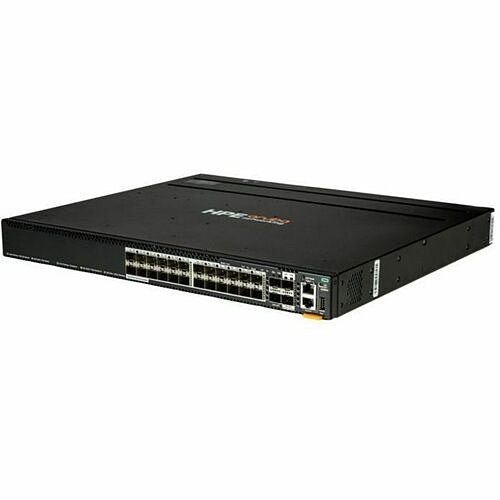
Aruba CX 6300M 24p SFP 1G 2p SFP56 50G 2p SFP28 25G MACsec Switch - Manageable - Gigabit Ethernet, 10 Gigabit Ethernet, 25 Gigabit Ethernet, 50 Gigabit Ethernet - 1000Base-X, 10GBase-X, 25GBase-X, 50GBase-X - 3 Layer Supported - 24 SFP Slots - 97 W P (S4P44A)
Aruba CX 6300M 24p SFP 1G 2p SFP56 50G 2p SFP28 25G MACsec Switch - Manageable - Gigabit Ethernet, 10 Gigabit Ethernet, 25 Gigabit Ethernet, 50 Gigabit Ethernet - 1000Base-X, 10GBase-X, 25GBase-X, 50GBase-X - 3 Layer Supported - 24 SFP Slots - 97 W P (S4P44A)
Part Number: S4P44A
Condition: New
Availability: 1
Real time availability 

Best of Cleveland Award in the Computers category

Compsource is honored to be named to the Inc. 500|5000 list

Ranked among the top 500 companies

Microsoft authorized Education reseller

HP Qualified Supplies Partner

BBB Accredited Business Since 2000



- Shipping Insurance
- Price Match Guarantee
- Terms of Service Guarantee
- Identity Theft Protection
Product Specifications
Aruba CX 6300M 24p SFP 1G 2p SFP56 50G 2p SFP28 25G MACsec Switch - Manageable - Gigabit Ethernet, 10 Gigabit Ethernet, 25 Gigabit Ethernet, 50 Gigabit Ethernet - 1000Base-X, 10GBase-X, 25GBase-X, 50GBase-X - 3 Layer Supported - 24 SFP Slots - 97 W P (S4P44A)
HPE ANW 6300M 24F 2L 2Y SW PERP - PL-WB
Manufacturer Part Number: S4P44A
MANUFACTURER NAME: Aruba Networks
MANUFACTURER PART NUMBER: S4P44A
UPC EAN CODE: 190017746319
LANGUAGE: EN
MARKET:US
| General Information: | |
The HPE Aruba Networking CX 6300 Switch Series is a modern, flexible, and intelligent family of stackable switches ideal for access, aggregation, and data center top-of-rack (ToR). With its cloud-native design, fully programmable operating system, and the HPE Aruba Networking CX Network Analytics Engine, the CX 6300 Series extends industry-leading monitoring and troubleshooting to the access layer. Support for HPE Aruba Networking Switch Multi-Edit Software and the CX mobile app verify that configurations are flawless and easy to deploy. A powerful ASIC architecture delivers fast, non-blocking performance, ready for tomorrow's unpredictable demands. HPE Aruba Networking Virtual Stacking Framework (VSF) allows for stacking of up to 10 switches, providing scale and simplified management. This flexible series has built-in high speed uplinks and supports high density IEEE 802.3bt high power PoE with HPE Smart Rate multi-gigabit Ethernet for APs and IoT devices. | What's new
Features | High Performance and Power The HPE Aruba Networking CX 6300 Switch Series uses a fully distributed architecture with Gen7 ASICs that deliver very low latency, increased packet buffering, and adaptive power consumption. All switching and routing are wire-speed to meet the demands of bandwidth-intensive applications. HPE Aruba Networking Virtual Switching Framework (VSF) allows you to quickly grow your network using high performance front plane stacking. Four built-in uplinks support speeds of up to 10, 25, 50, and 100 GbE for a total of 200 to 400 Gbps of stacking throughput per switch. CX 6300 Series switches may be deployed in a 2-member active-active design using HPE Aruba Networking Virtual Switching Extension (VSX) and an inter-switch link (ISL) for a high availability solution that maintains state synchronization and an independent control plane across both switches. | |
| Manufacturer | Hewlett Packard Enterprise |
| Manufacturer Part Number | S4P44A |
| Manufacturer Website Address | http://www.hpe.com |
| Brand Name | Aruba |
| Product Series | CX 6300 |
| Product Model | CX 6300M |
| Product Name | CX 6300M 24p SFP 1G 2p SFP56 50G 2p SFP28 25G MACsec Switch |
| Product Type | Ethernet Switch |
| Product UPC | 190017746319 |
| Technical Information: | |
| Features | Remote Monitoring (RMON)
Virtual Extensible LAN (VXLAN) |
| AI-powered | Yes |
| Interfaces/Ports: | |
| Stack Port | Yes |
| Port/Expansion Slot Details | 24 x Gigabit Ethernet Expansion Slot
2 x Gigabit Ethernet Expansion Slot 1 x USB-C Console Port 1 x Out of Band Management Port 1 x USB Type A Host Port |
| Media & Performance: | |
| Media Type Supported | Optical Fiber |
| Ethernet Technology | Gigabit Ethernet
10 Gigabit Ethernet 25 Gigabit Ethernet 50 Gigabit Ethernet |
| Network Technology | 1000Base-X
10GBase-X 25GBase-X 50GBase-X |
| Maximum Data Transfer Rate | 6.25 GB/s |
| I/O Expansions: | |
| Total Number of Expansion Slots | 28 |
| Expansion Slot Type | SFP
SFP+ SFP56 SFP28 |
| Number of SFP Slots | 24 |
| Network & Communication: | |
| Layer Supported | 3 |
| Management & Protocols: | |
| Manageable | Yes |
| Power Description: | |
| Input Voltage | 120 V AC
230 V AC 36 V DC 72 V DC |
| Power Source | Power Supply
AC/DC |
| Power Consumption | 97 W |
| Physical Characteristics: | |
| Compatible Rack Unit | 1U |
| Form Factor | Rack-mountable |
| Height | 1.7" |
| Width | 17.4" |
| Depth | 15.2" |
| Weight (Approximate) | 13.27 lb |
Questions and Answers
Questions and Answers | Ask CompSource |
Shipping / Returns
Shipping
Ground =
FREE
(EST. Arrival Date between
Mon.Apr.27 - Thu.Apr.30)
Two Day Air = $44.00
(EST. Arrival Date on Mon.Apr.27)
Standard One Day = $74.00
(EST. Arrival Date on Fri.Apr.24 after 3PM)
Priority = $110.00
(EST. arrival Date on Fri.Apr.24 in the AM)
U.S Mail Priority (AA,AE,AP only) = $51.33
FedEx International Economy (Canada only) = $104.00
Shipping dates are best estimates based on product location and may vary with holidays.
If product requires trucking, additional fees may apply.
* Some destinations are subject to Applicable State/Duty Taxes
Returns
CompSource realizes that every product may have different return guidelines. Please see the policy below regarding this item.
This Product Has Limited Exchange Privileges.
Please call for return guidelines.
For support on this product, please contact Aruba Networks.
Aruba Networks Company's Information
Accessories




Product Reviews
Overall Rating | Write a Review
|
|
Best Sellers
More Best Sellers



Recently Viewed



Learn more about Switches & Bridges
Network Switch Buying Guide
Connect Multiple Devices to a Network and Route Data to Designated Devices
What is a network switch and what does it do?
A network switch connects devices to a local area network (LAN) and allows the devices to communicate over the network. For example, you can connect computers, printers and servers to the same network switch and route data between them. Unlike an Ethernet hub, which transmits the same data through every output, a network switch sends data only to the devices designated to receive it. This improves the efficiency and potential throughput of the network.

Are there different types of network switches?
There are two main types of network switches, unmanaged and managed. The essential difference is the capability to configure the operation of a managed switch to customize and optimize network traffic for specific applications.
Unmanaged Switches
- Offer plug-and-play functionality
- Switch operation cannot be modified
- CompSource offers desktop and rack-mount unmanaged switches
Managed Switches
- Provide the ability to manage, prioritize and monitor LAN traffic
- Offer one or more ways to modify switch operation
- CompSource offers smart managed switches that feature an RJ45 console port and command line interface (CLI)
Where do you place network switches?
Network switches are usually placed on a desk or table, mounted on a wall, or mounted in a rack. CompSource offers unmanaged desktop switches (with metal or plastic housing) and both unmanaged and managed rack-mount switches with metal housing and a built-in PDU (Gigabit Ethernet Switch PDU Combos).

What is a Gigabit Ethernet Switch PDU Combo?
CompSource offers an exclusive line of unmanaged and managed Gigabit Ethernet switches that have Power over Ethernet (PoE).

Factors to Consider
Does your application require a managed switch?
If your application involves controlling network traffic, you will need the features of a managed switch. The following are some examples of tasks that require a managed switch:
- Controlling access between departments within your LAN
- Running many bandwidth-intensive applications simultaneously
- Giving important data greater priority in your LAN
- Improving the performance of a busy network
- Implementing VoIP, wireless LANs or other advanced services
How many devices do you need to connect to your network?
Make sure you select a switch with enough Gigabit (10/100/1000 Mbps) Ethernet ports for the devices you want to connect to your network. If you think you'll add more devices in the future, choose a switch that will give your network room to grow.

Do you need to connect multiple network switches?
If you plan to connect multiple network switches, look for models with SFP uplink ports (also known as Mini-GBIC ports). SFP uplink ports are connection points for SFP (small form-factor pluggable) modules that allow the switch to uplink to other switches using optical fiber cabling.
Power over Ethernet (PoE) uses existing network cables to power connected devices, such as VoIP phones, wireless access points and surveillance cameras. If you need this functionality, look for a switch with Gigabit Ethernet ports that support PoE. Make sure the power per port (in watts) and the total power budget of the PoE ports meet the needs of your electronic devices.
CompSource will educate and help make this process enjoyable and easy.
Whether you're planning on using your network for basic home tasks or enterprise level security. You can tell our trained sales professionals your needs, and we'll make custom recommendations to suit your specifications and budget. Our reps have extensive knowledge and love to share. We educate, not sell, CompSource makes sure you buy what you need and not waste money on what you don't. As with every decision we never push, it's up to you when, and if you make a purchase.
CompSource has a great technical staff that can help with a solution for your exact needs.
Chat with us or give our professionals a quick phone call (800)-413-7361.
fast shipment, product as described, always the best deal, would buy from again. JnapMore Reviews