
 Previous
Next
Previous
Next

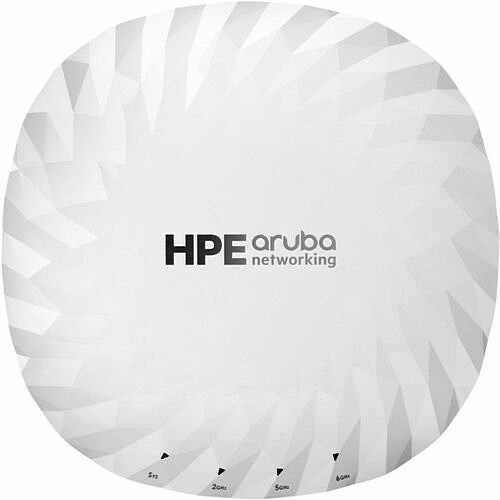
Aruba AP-745 Tri Band Wi-Fi 7 IEEE 802.11a/b/g/n/ac/ax/be/az/mc 9 Gbit/s Wireless Access Point - Indoor - Yes - 2.40 GHz, 5 GHz, 6 GHz - Internal - MIMO Technology - Single User/Multi User MIMO - 1 x Network (RJ-45) - 5 Gigabit Ethernet, 2.5 Gigabit (S5R01A)
Aruba AP-745 Tri Band Wi-Fi 7 IEEE 802.11a/b/g/n/ac/ax/be/az/mc 9 Gbit/s Wireless Access Point - Indoor - Yes - 2.40 GHz, 5 GHz, 6 GHz - Internal - MIMO Technology - Single User/Multi User MIMO - 1 x Network (RJ-45) - 5 Gigabit Ethernet, 2.5 Gigabit (S5R01A)
Part Number: S5R01A
Condition: New
Availability:
Out of stock
Real time availability 
Notify Me

Best of Cleveland Award in the Computers category

Compsource is honored to be named to the Inc. 500|5000 list

Ranked among the top 500 companies

Microsoft authorized Education reseller

HP Qualified Supplies Partner

BBB Accredited Business Since 2000



- Shipping Insurance
- Price Match Guarantee
- Terms of Service Guarantee
- Identity Theft Protection
Product Specifications
Aruba AP-745 Tri Band Wi-Fi 7 IEEE 802.11a/b/g/n/ac/ax/be/az/mc 9 Gbit/s Wireless Access Point - Indoor - Yes - 2.40 GHz, 5 GHz, 6 GHz - Internal - MIMO Technology - Single User/Multi User MIMO - 1 x Network (RJ-45) - 5 Gigabit Ethernet, 2.5 Gigabit (S5R01A)
HPE ANW AP-745 (US) CAMPUS Access Point Wireless - PL-VL
Manufacturer Part Number: S5R01A
MANUFACTURER NAME: Aruba Networks
MANUFACTURER PART NUMBER: S5R01A
UPC EAN CODE: 190017782775
LANGUAGE: EN
MARKET:US
| General Information: | |
The HPE Aruba Networking 740 Series Campus Access Points are rightsized Wi-Fi 7 access points designed to deliver high-capacity and secure Wi-Fi connectivity ideal for a wide range of indoor use cases. Leveraging the latest Wi-Fi 7 standard, these access points enhance security across both wired and wireless networks, support IoT devices, and provide accurate location-aware capabilities. HPE Aruba Networking Central helps drive efficient operations and provides AI-automation and machine learning (ML) insights for fine-tuned wireless connectivity across diverse environments. Future-proof with the HPE Aruba Networking 740 Series Campus Access Points that deliver up to 9 Gbps maximum tri-band aggregate data rate and go beyond the standard with built-in flexible IoT radio that supports Bluetooth or 802.15.4/Zigbee, a fast 5GbE wired port, and AI-powered dynamic power save mode that helps reduce energy consumption. Like all the HPE Aruba Networking access points, this series is Wi-Fi certified and includes a limited lifetime warranty for investment protection. AI-powered Wi-Fi 7 Managing Wi-Fi 7 access points is easier with HPE Aruba Networking Central that provides intelligent automation, AI insights, and unified infrastructure management. HPE Aruba Networking access points work in tandem with the HPE Aruba Networking Central network management system to securely orchestrate users, apps, and IoT connections. HPE Aruba Networking Central provides observability that extends to third-party devices and management of campus wired and wireless assets, powered by purpose-built AI. The HPE Aruba Networking 740 Series Campus Access Points is supported by HPE Aruba Networking Central running HPE Aruba Networking Wireless Operating System (OS 10). More capacity The HPE Aruba Networking 740 Series Campus Access Points are designed to take advantage of every bit of available spectrum using three dedicated radios, which translates into high speeds, wider channels for multi-gigabit traffic, and less interference. Supporting up to 160 MHz wide channels, the series delivers up to 9 Gbps maximum tri-band aggregate data rate, using up to 4x4 MIMO radios (2x2: 2.4 GHz, 4x4: 5 GHz, and 4x4: 6 GHz). Powerful 4x4 MIMO radios The HPE Aruba Networking 740 Series Campus Access Points can sustain 3- and 4-spatial stream data rates with supported clients. It also supports 4-spatial stream MU-MIMO with two 2SS client devices and adds MIMO redundancy when using 2SS client devices to increase the likelihood of 2SS rates versus slower 1SS data rate. Wi-Fi 7 for faster speeds, more capacity The Wi-Fi 7 standard (802.11be) extends the capabilities of Wi-Fi 6E, including the use of the 6 GHz band. New capabilities include multilink operation (MLO) for channel aggregation across different bands and failover, 4096 QAM (4K QAM) modulation for higher peak data rates, and spectrum puncturing to avoid interference or incumbent users of the 6 GHz band. The Wi-Fi 7 standard also includes optional support for wide 320 MHz channels, which are supported on the HPE Aruba Networking 750 Series Campus Access Points and the HPE Aruba Networking 730 Series Campus Access Points. | |
| Manufacturer | Hewlett Packard Enterprise |
| Manufacturer Part Number | S5R01A |
| Manufacturer Website Address | http://www.hpe.com |
| Brand Name | Aruba |
| Product Series | 740 |
| Product Model | AP-745 |
| Product Name | AP-745 Wireless Access Point |
| Product Type | Wireless Access Point |
| Product UPC | 190017782775 |
| Technical Information: | |
| Wireless LAN Standard | IEEE 802.11a/b/g/n/ac/ax/be/az/mc |
| Bluetooth Standard | Bluetooth 5.4 |
| Network Band | Tri Band |
| Frequency Band | 2.40 GHz
5 GHz 6 GHz |
| Indoor/Outdoor | Indoor |
| Wireless Transmission Speed | 9 Gbit/s |
| MIMO Technology | Yes |
| MIMO Type | Single User/Multi User MIMO |
| Number of Bandwidth Streams | 4 |
| Beamforming Technology | Yes |
| Data Encryption | Yes |
| Encryption Standard | WPA3
WPA2-MPSK WPA2 WPA WPA3-ENT WPA3-Personal Opportunistic Wireless Encryption (OWE) |
| AI-powered | Yes |
| ZigBee | Yes |
| Interfaces/Ports: | |
| Ethernet Technology | 5 Gigabit Ethernet
2.5 Gigabit Ethernet Gigabit Ethernet Fast Ethernet |
| Number of Network (RJ-45) Ports | 1 |
| PoE PD Port | Yes |
| USB | Yes |
| USB Standard | USB 2.0 Type A |
| Management Port | Yes |
| Network & Communication: | |
| Wi-Fi Generation | Wi-Fi 7 |
| Physical Characteristics: | |
| Form Factor | Ceiling Mountable |
| Antenna Form Factor | Internal |
| Height | 2.2" |
| Width | 9.4" |
| Depth | 9.4" |
| Miscellaneous: | |
| Application/Usage | Office
Campus |
| TAA Compliant | No |
| Warranty: | |
| Warranty | Lifetime |
Questions and Answers
Questions and Answers | Ask CompSource |
Shipping / Returns
Shipping
Ground =
FREE
(Delivery within 2-7 business days)
Two Day Air = $28.00
(Delivery within 2 business days)
Standard One Day = $49.00
(Delivery within next business day)
Priority = $75.00
(Delivery within next business morning)
U.S Mail Priority (AA,AE,AP only) = $38.50
FedEx International Economy (Canada only) = $88.00
Typically out of stock items are filled within 1 to 14 business days but can and may take longer.
Shipping dates are best estimates based on product location and may vary with holidays.
If product requires trucking, additional fees may apply.
* Some destinations are subject to Applicable State/Duty Taxes
Returns
CompSource realizes that every product may have different return guidelines. Please see the policy below regarding this item.
This Product Has Limited Exchange Privileges.
Please call for return guidelines.
For support on this product, please contact Aruba Networks.
Aruba Networks Company's Information
Accessories


Product Reviews
Overall Rating | Write a Review
|
|
Best Sellers
More Best Sellers




Recently Viewed




Learn more about Wireless Access Points
Switches, routers, and wireless access points
Switches, routers, and wireless access points perform very different functions in a network.
A computer network, or data network, is a digital telecommunications network which allows nodes to share resources. In computer networks, computing devices exchange data with each other using connections (data links) between nodes These data links are established over cable media such as wires or optic cables, or wireless media such as WiFi.Switches
Switches are the foundation of most business networks. A switch acts as a controller, connecting computers, printers, and servers to a network in a building or a campus.
Switches allow devices on your network to communicate with each other, as well as with other networks, creating a network of shared resources. Through information sharing and resource allocation, switches save money and increase productivity.
There are two basic types of switches to choose from as part of your networking basics: managed and unmanaged.
- An unmanaged switch works out of the box but can't be configured. Home-networking equipment typically offers unmanaged switches.
- A managed switch can be configured. You can monitor and adjust a managed switch locally or remotely, giving you greater control over network traffic and access.
Routers
Routers connect multiple networks together. They also connect computers on those networks to the Internet. Routers enable all networked computers to share a single Internet connection, which saves money.
A router acts a dispatcher. It analyzes data being sent across a network, chooses the best route for data to travel, and sends it on its way.
Routers connect your business to the world, protect information from security threats, and can even decide which computers receive priority over others.
Beyond those basic networking functions, routers come with additional features to make networking easier or more secure. Depending on your needs, for example, you can choose a router with a firewall, a virtual private network (VPN), or an Internet Protocol (IP) communications system.
Access points
An access point* allows devices to connect to the wireless network without cables. A wireless network makes it easy to bring new devices online and provides flexible support to mobile workers.
An access point acts like an amplifier for your network. While a router provides the bandwidth, an access point extends that bandwidth so that the network can support many devices, and those devices can access the network from farther away.
But an access point does more than simply extend Wi-Fi. It can also give useful data about the devices on the network, provide proactive security, and serve many other practical purposes.
*Access points support different IEEE standards. Each standard is an amendment that was ratified over time. The standards operate on varying frequencies, deliver different bandwidth, and support different numbers of channels.
Wireless networking
Wireless networking is a method by which homes, telecommunications networks and business installations avoid the costly process of introducing cables into a building, or as a connection between various equipment locations.CompSource will educate and help make this process enjoyable and easy.
Whether you're planning on using your network for basic home tasks or enterprise level security. You can tell our trained sales professionals your needs, and we�ll make custom recommendations to suit your specifications and budget. Our reps have extensive knowledge and love to share. We educate, not sell, CompSource makes sure you buy what you need and not waste money on what you don't. As with every decision we never push, it's up to you when, and if you make a purchase.
CompSource has a great technical staff that can help with a solution for your exact needs.
Chat with us or give our professionals a quick phone call (800)-413-7361.
Purchased a new Sony FDR-AX53 camcorder at a substantial savings (over other retailers). Item arrived sooner than expected, well packaged and as described. I have yet to use it, but I am anticipating good performance. (This is my 3rd Sony camcorder and I have always been impressed.) CarpMore Reviews