



 Previous
Next
Previous
Next


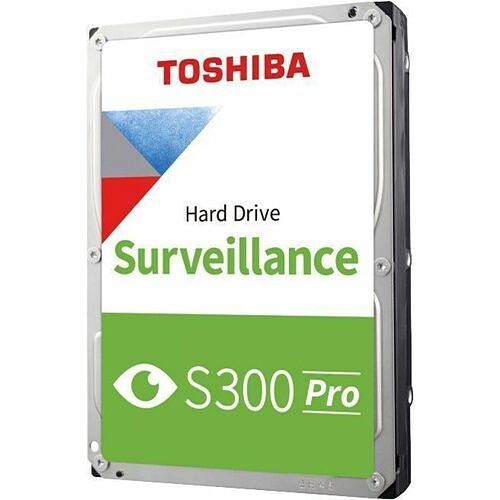
Toshiba S300 Pro HDWTA80UZSVA 8 TB Hard Drive - 3.5" Internal - SATA (SATA/600) - Conventional Magnetic Recording (CMR) Method - Camera, Video Surveillance System, Network Video Recorder, Digital Video Recorder, Storage Array Device Supported - 7200r
Toshiba S300 Pro HDWTA80UZSVA 8 TB Hard Drive - 3.5" Internal - SATA (SATA/600) - Conventional Magnetic Recording (CMR) Method - Camera, Video Surveillance System, Network Video Recorder, Digital Video Recorder, Storage Array Device Supported - 7200r
Part Number: HDWTA80UZSVA
Condition: New
Availability:
Out of stock
Real time availability 
Notify Me

Best of Cleveland Award in the Computers category

Compsource is honored to be named to the Inc. 500|5000 list

Ranked among the top 500 companies

Microsoft authorized Education reseller

HP Qualified Supplies Partner

BBB Accredited Business Since 2000



- Shipping Insurance
- Price Match Guarantee
- Terms of Service Guarantee
- Identity Theft Protection
Product Specifications
Toshiba S300 Pro HDWTA80UZSVA 8 TB Hard Drive - 3.5" Internal - SATA (SATA/600) - Conventional Magnetic Recording (CMR) Method - Camera, Video Surveillance System, Network Video Recorder, Digital Video Recorder, Storage Array Device Supported - 7200r
TOSHIBA S300 PRO 8TB 3.5 - SURVEILLANCE 3.5 INTERNAL HDD CMR
Manufacturer Part Number: HDWTA80UZSVA
MANUFACTURER NAME: Toshiba
MANUFACTURER PART NUMBER: HDWTA80UZSVA
UPC EAN CODE:
LANGUAGE: EN
MARKET:US
| General Information: | |
The Toshiba S300 Pro Surveillance Internal Hard Drives deliver up to 10 TB of storage capacity and support up to 64 high-definition surveillance video cameras for around-the-clock security. The S300 Pro is designed for 24/7 operation, supporting up to 1.2 million hour MTTF/MTBF and up to 300 TB per year workloads rating, giving you peace of mind knowing that your surveillance stays vigilant. With a range of available large capacities and 7,200 rpm performance, the S300 Pro offers real-time drive performance that supports high-resolution video recording and streaming and longer content retention periods. For high reliability and scalability in RAID and multi-disk enclosures, the S300 Pro utilizes RV sensor technology to compensate for the effects of vibration from adjacent drives or cooling fans. Robust cache size helps to support smooth video recording and guard against frame drops. Toshiba S300 Pro Surveillance Internal Hard Drive | Application
Robust Performance Workload rate of up to 300 TB/yr. MTTF/MTBF up to 1.2 million hours Built to Last Mitigate Rotational Vibration with built-in RV sensors. Designed to work in a wide temperature range. Optimized Recording & Playback Fast 7200 RPM speed with large cache size to help reduce frame loss High Reliability Designed for 24/7 security systems. CMR recording technology provides consistent performance and broad compatibility. Rich Scalability Support up to 64 HD cameras Massive Capacity Capture and retain surveillance-critical frame Peace of Mind Toshiba five-year limited warranty | |
| Manufacturer | Toshiba |
| Manufacturer Part Number | HDWTA80UZSVA |
| Manufacturer Website Address | http://www.toshiba.com |
| Brand Name | Toshiba |
| Product Line | S300 Pro |
| Product Model | HDWTA80UZSVA |
| Product Name | S300 Pro Surveillance Internal Hard Drive |
| Package Type | Bulk |
| Product Type | Hard Drive |
| Technical Information: | |
| Storage Capacity | 8 TB |
| Disk Format | 512e |
| Recording Technology | Conventional Magnetic Recording (CMR) |
| Drive Performance: | |
| Spindle Speed (rpm) | 7200 |
| Buffer | 512 MB |
| Endurance (TBW) | 300 TB |
| Mean Time Between Failures (MTBF) | 136.9 Year |
| Interfaces/Ports: | |
| Drive Interface | SATA |
| Drive Interface Standard | SATA/600 |
| Physical Characteristics: | |
| Drive Type | Internal |
| Form Factor | 3.5" |
| Height | 1" |
| Width | 4" |
| Length | 5.8" |
| Weight (Approximate) | 1.61 lb |
| Miscellaneous: | |
| Device Supported | Camera
Video Surveillance System Network Video Recorder Digital Video Recorder Storage Array |
| Environmental Compliance | Restriction of Hazardous Substances (RoHS) |
| Warranty: | |
| Warranty | 5 Year |
What Can Your Device Hold?

1Photos based on a 10-Megapixel camera producing images 5MB in size
2Songs based on average length of 4 minutes, 4MB size
3HD video based on 720p or 1080i video
4Blu-ray HD Movie was calculated at 16.2Gb per hour recording rate
Questions and Answers
Questions and Answers | Ask CompSource |
Shipping / Returns
Shipping
Ground =
FREE
(Delivery within 2-7 business days)
Two Day Air = $25.00
(Delivery within 2 business days)
Standard One Day = $35.00
(Delivery within next business day)
Priority = $45.00
(Delivery within next business morning)
U.S Mail Priority (AA,AE,AP only) = $30.00
FedEx International Economy (Canada only) = $85.00
Typically out of stock items are filled within 1 to 14 business days but can and may take longer.
Shipping dates are best estimates based on product location and may vary with holidays.
If product requires trucking, additional fees may apply.
* Some destinations are subject to Applicable State/Duty Taxes
Returns
CompSource realizes that every product may have different return guidelines. Please see the policy below regarding this item.
This Product Has Limited Exchange Privileges.
Please call for return guidelines.
For support on this product, please contact Toshiba. (800) TOSHIBA www.toshiba.com
Toshiba Company's Information

Click Toshiba for all products
Toll Free #: (800) TOSHIBA
Tech Support #: (800) 457-7777
Site: www.toshiba.com
Accessories



Product Reviews
Overall Rating | Write a Review
|
|
Best Sellers
More Best Sellers


Rebates
More Rebates

Recently Viewed



About Toshiba
Why Toshiba Technologies Are a Smart Choice – And Why You Should Buy from Compsource
Since 1875, Toshiba has been a global leader in innovation, delivering cutting-edge technologies that power industries, businesses, and homes around the world. With a mission of being “Committed to People, Committed to the Future,” Toshiba continues to shape the future through its dedication to quality, sustainability, and technological advancement.
What Toshiba Has to Offer
- Business Solutions: Multifunction printers, copiers, document management systems, and toner products through Toshiba America Business Solutions (TABS).
- Industrial & Energy Systems: Motors, drives, power systems, and steam turbines via Toshiba International Corporation (TIC).
- Semiconductors & Storage: Advanced microcontrollers, ASICs, HDDs, and wireless components through Toshiba America Electronic Components (TAEC).
- Healthcare & Imaging: Medical tubes and imaging technologies for diagnostic and industrial use.
Why Choose Toshiba?
Toshiba is known for its reliability, innovation, and global reach. Whether you're a business looking for scalable solutions or a tech enthusiast seeking high-performance components, Toshiba delivers with precision and trust.
Why Buy Toshiba from Compsource?
- Authorized Reseller: Compsource is a trusted source for genuine Toshiba products.
- Competitive Pricing: Get the best deals on Toshiba technologies without compromising on quality.
- Fast & Free Shipping: We deliver quickly so you can get to work faster.
- Expert Support: Our knowledgeable team is here to help you choose the right Toshiba solution for your needs.
We want this to be as easy and stress-free as possible. CompSource is here to help with your Toshiba purchase. We're here to help you decide. Chat with us or give our professionals a quick phone call (800)-413-7361, we can assist with the best Toshiba solution for your needs and budget.
Here are our most popular categories;- Hard Drives
- Toners & Ink Cartridges
- Printer Parts & Components
- Thermal & Label Printers
- Power Adapters
- Chargers
© 2025 CompSource Inc. All rights reserved.
About the Author

Mason Maynard
Mason Maynard is a people-oriented individual who finds joy in spending quality time with friends and family, valuing strong personal connections. With a strong interest in Marketing and Sales, Mason thrives on creating impactful strategies that engage audiences and drive meaningful results. Mason is passionate about innovation, business growth, and delivering top-tier customer service.
Connect with Mason on: LinkedIn